

BUSINESS CONTINUITY & DISASTER RECOVERY
Business Continuity and Disaster Recovery Solutions for Small Business
Short answer: Business continuity is how your firm keeps serving clients when something goes wrong, whether that's ransomware, a dead server, a flood or a Microsoft 365 account takeover. Disaster recovery is the IT part of that plan: getting systems and data back. 24uNet builds both for small businesses in Denver, Colorado Springs and across Colorado, and in Bryan–College Station and across Texas. That means a written BC/DR plan, backups we actually test by restoring, and a recovery approach sized to what your business can live without.
Denver (303) 468-5515 · College Station (979) 256-5100 · sales@24unet.com
Not ready to talk? Get the free Security Baseline checklist, which includes the backup and recovery lines we check first.
Business continuity vs. disaster recovery: what's the difference?
Business continuity is the whole-business question: if the office, the network or a key system is unavailable, how do people keep working, who decides what, and how do clients hear from you? Ready.gov describes it as organizing a continuity team and compiling a plan to manage a business disruption.
Disaster recovery is the technology piece inside that plan. Ready.gov says an IT disaster recovery plan should be developed in conjunction with the business continuity plan, with IT priorities and recovery time objectives set during the business impact analysis. In short, the business decides what matters most, and IT recovery follows those priorities, not the other way around.
That's why our business continuity solutions start with a conversation about how your firm works, not with a product.
What goes into a small business BC/DR plan
A useful business continuity and disaster recovery plan is short enough that people will read it. Ours cover:
• Critical functions and systems: what stops work (email, file shares, line-of-business apps, phones, accounting) and who depends on each.
• Business impact analysis: how long each function can be down and how much recent work you could afford to redo.
• Recovery strategies: backups, alternate locations, cloud failover or manual workarounds for each system.
• Roles and contacts: who declares a disaster, who calls clients, insurers and the bank, and who talks to us.
• Communication: how staff, clients and vendors get updates if email itself is down.
• Testing and review: tabletop walk-throughs and restore tests on a schedule, plus updates when people or systems change.
For a deeper look at the moving parts, read our post on top disaster recovery solutions for businesses.
Backup and restore testing: business continuity and backup solutions that prove themselves
A backup you've never restored is a hope, not a plan. Our business continuity and backup solutions include:
• Backups that run automatically, with at least one copy kept offsite and separated from your everyday network and admin accounts, so ransomware can't reach it as easily.
• Scheduled restore tests: we restore files, mailboxes and full systems, record what worked, and fix what didn't.
• Backup alerts that a person reviews, not just an inbox that fills up.
• Written results you can show an insurer, client or examiner.
Backup and recovery are part of the 24uNet Security Baseline, the standard every client environment is measured against.
Hot site vs. warm site vs. cold site: which is best for your business continuity needs?
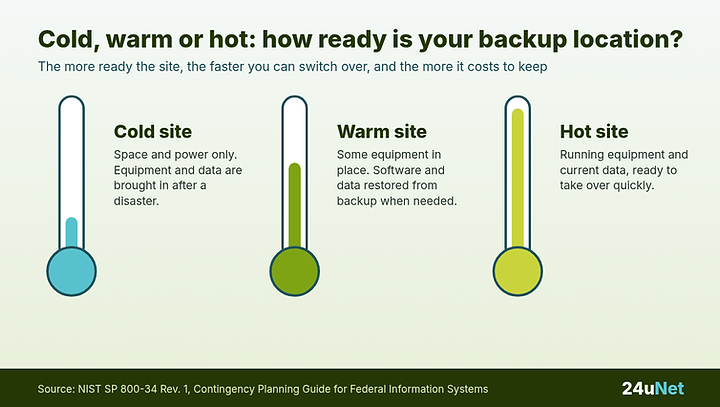
If your office or main systems are unavailable, where does the work happen? NIST SP 800-34 describes three common alternate site types:
• Cold site: space and basic infrastructure (power, connectivity, climate control), but equipment and data have to be brought in and set up after a disaster. It costs the least to maintain and takes the longest to recover.
• Warm site: some equipment is already in place, but software and data still have to be restored from backup. It sits in the middle on cost and recovery time.
• Hot site: running equipment and current data, ready to take over quickly. It's the most ready and the most expensive to keep.
Which is best? The one that matches how long each system can be down. For most 10–75 person firms, the answer is a mix. Cloud services like Microsoft 365 already run elsewhere, a key server or app might justify a warm, cloud-based standby, and everything else can be restored from tested backups to replacement equipment. Staff working from home or another office can also count as part of your alternate site plan. We walk through the choice step by step in Hot Site vs. Warm Site vs. Cold Site: Which Disaster Recovery Setup Fits a Small Business?.
RTO and RPO in plain English
These two terms drive every disaster recovery decision:
• RPO (recovery point objective): looking back from the disruption, how much recent work can you afford to lose and redo? That decides how often backups run.
• RTO (recovery time objective): looking forward, how long can a system be down before it seriously hurts the business? That decides which recovery approach you need.

There's no single right number. We set RTO and RPO with you, system by system, then build and test backups to match. You decide the targets based on your business, and the testing shows whether they hold.
Microsoft 365 backup
Microsoft keeps its service running, but it's on you to protect your own data from accidental deletion, a departing employee, a compromised account or ransomware syncing through OneDrive. Our post on whether Microsoft 365 backs up your data explains the gap. As part of your disaster recovery solutions for business continuity, we back up mailboxes, OneDrive, SharePoint and Teams data separately and test restores like any other system.
Ransomware recovery
Ransomware is the disaster most small firms are likeliest to face. Recovery depends on decisions made before the attack: backups kept offsite and separated from everyday admin accounts, a clear first-hour plan, and knowing who calls the insurer. The first hour of a cyberattack shows how differently that hour goes with and without a plan. Architecture and engineering firms can also read ransomware protection for A&E firms. Prevention matters too, so network security reviews and the Security Baseline reduce the chance you'll need the recovery plan at all.
Business recovery solutions for the industries we serve
• Law firms: matter files, document management and deadlines that don't move because your server did.
• Financial services and RIAs: client records, books and records obligations and examiner questions about your plan.
• Engineering firms: large project files, CAD and modeling data and shared drives that whole teams depend on.
• Architecture firms: design files, versions and client deliverables under deadline.
Serving Colorado and Texas
From Denver, we support businesses across the Front Range and Colorado Springs. In Texas, we serve Bryan–College Station and firms statewide. Texas businesses can pair their BC/DR plan with our Texas cybersecurity program, which is built to support the SB 2610 safe harbor.
FAQ
Business continuity FAQ
What is a business continuity solution?
It's the plan, people and technology that keep a business serving clients through a disruption. For a small firm that usually means a written BC/DR plan, tested backups, a way to work from another location and a clear way to communicate.
What is the difference between business continuity and disaster recovery?
Business continuity covers the whole business: people, locations, clients and communication. Disaster recovery is the IT part: restoring systems and data. Ready.gov recommends building the IT disaster recovery plan alongside the business continuity plan.
Which hot site for disaster recovery is best for my business continuity needs?
The best site is the one that matches how long each system can be down. Hot sites are the most ready and the most expensive. Warm sites restore software and data from backup onto equipment already in place. Cold sites provide space and power only. Most small firms use a mix of cloud services, a warm standby for key systems and tested backups.
What are RTO and RPO?
RTO is how long a system can be down before it seriously hurts the business. RPO is how much recent work you can afford to lose and redo. You set both per system, and they decide how often backups run and which recovery approach you need.
Does Microsoft 365 back up our data?
Microsoft keeps the service running, but protecting your data from deletion, account compromise and ransomware is your responsibility. A separate Microsoft 365 backup with tested restores closes that gap.
How often should we test backups and our recovery plan?
On a regular schedule, and whenever key systems or people change. Testing means actually restoring files, mailboxes and systems, plus a tabletop walk-through of the plan with the people who will use it.
Can a small business afford disaster recovery?
Yes, because the plan is sized to your business. Not every system needs a hot site. Matching each system to what you can tolerate keeps spending on the systems that matter most.
Do you provide business continuity services in Denver and College Station?
Yes. 24uNet serves Denver, Colorado Springs and Colorado, and Bryan–College Station and Texas. Call Denver at (303) 468-5515 or College Station at (979) 256-5100, or email sales@24unet.com.
Find out how long your business could keep running
We'll review your backups, restore testing and recovery plan, and show you the gaps in plain English.
Denver (303) 468-5515 · College Station (979) 256-5100 · sales@24unet.com
Sources: Ready.gov, Business Continuity Planning; Ready.gov, IT Disaster Recovery Plan; NIST SP 800-34 Rev. 1, Contingency Planning Guide for Federal Information Systems.

ABOUT THE AUTHOR
Dane Gray, CEH, CompTIA Security+
Cofounder, 24uNet. 30+ years in IT and cybersecurity. CMMC-AB Registered Practitioner, CompTIA Security+, CEH. Texas A&M '91.
Last reviewed: October 15, 2026